
MT5 Expert Advisor
Golden Pocket EA
Automates trend-side pullback entries around dynamic MA/ATR Fibonacci levels with stop-order or market-touch execution and risk-aware trade management.

Fit check
Review fit, evidence, and next action.
Best for
- Automated trend pullback execution inside the 0.618-0.786 zone
- Testing stop-order sequence and market-touch entries from selected Fibonacci levels
Not for
- Blind live trading without Strategy Tester, demo, and broker-specific validation
- Grid, martingale, high-frequency scalping, or random Fibonacci-touch trading
Evidence
Next step
- Platform
- MetaTrader 5
- Type
- Expert Advisor
- Access
- MQL5 Market
- Premium
- Version
- v1.1
- Available on MQL5 Market
Performance evidence
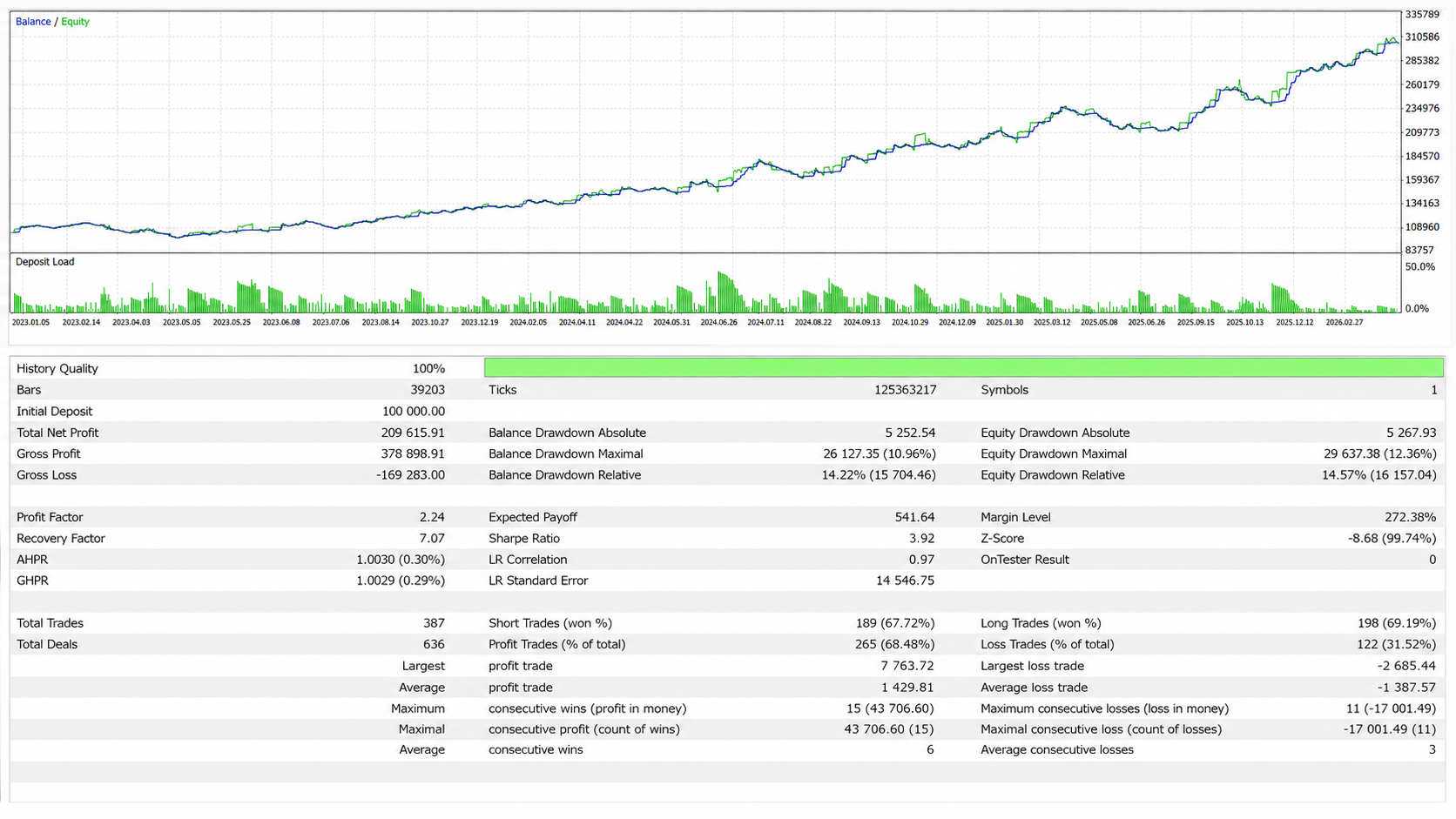
Strategy Tester evidence for linked setfiles. These snapshots document tested scenarios only; they are not live performance guidance.
Backtests
Linked setfiles, not live guidance.
- Return
- Net profit: 209,615.91
- +209.62%
- Max equity DD
- Maximal: 29,637.38
- 12.36%
- Win rate
- Profitable closed trades
- 68.48%
Return on initial deposit
Maximum equity drawdown
Strategy Tester metric
Test context
XAUUSD M30, linked to one setfile.
- Symbol / TF
- XAUUSD M30
- Test period
- Jan 2023 to May 2026
- 3 years 4 months
- Modelling
- 100% history quality
- Linked setfile
- Golden Pocket EA XAUUSD M30
- v1.1 · 2026-05-28
- Source
- MetaTrader 5 Strategy Tester screenshot
Testing assets
Linked setfiles are research baselines for the named symbol and timeframe. Treat them as starting points for Strategy Tester work, not live trading instructions.
Golden Pocket EA XAUUSD M30
Current XAUUSD M30 starter configuration for testing Golden Pocket EA v1.1 with the linked Strategy Tester snapshot.
- Platform
- MetaTrader 5
- Asset
- XAUUSD
- Timeframe
- M30
- Profile
- XAUUSD M30 v1.1
v1.1 · 2026-05-28
v1.1
2026-05-28
8 KB
Optional legacy downloadsOlder versionsArchived baselines stay available here while the current v1.1 setfiles remain the primary downloads.1 file
Golden Pocket EA XAUUSD M30 v1.0
v1.0Legacy XAUUSD M30 starter configuration retained for users who still need the previous v1.0 baseline.
- Platform
- MetaTrader 5
- Asset
- XAUUSD
- Timeframe
- M30
- Profile
- Legacy XAUUSD M30 v1.0
Golden Pocket EA turns a discretionary pullback idea into a defined MetaTrader 5 workflow. It calculates the active MA/ATR trend structure, maps the Fibonacci sequence, and applies execution, stop, target, sizing, filter, and management rules on the current chart symbol and timeframe.
The tool is built for one question: has price pulled back into a dynamic value area while the trend model still supports continuation? It does not treat every Fibonacci touch as a trade.
Market model
The Golden Pocket usually means the 0.618 to 0.786 retracement area of a prior move. Traders use it to review whether a trend is pulling back into value or losing structure.
Static Fibonacci drawings can drift. A different anchor can move the zone, and a familiar ratio can look meaningful even when the market is noisy. Golden Pocket EA reduces that discretion by deriving the 0.5, 0.618, 0.786, and structural 1.0 levels from a moving-average and ATR structure model.
The result is a stricter pullback framework. The 0.618 to 0.786 area remains the value zone. The 0.5 level becomes part of the sequence and can also be used as a stop-order reference. The 1.0 level frames structural invalidation.
What the EA controls
Golden Pocket EA controls the mechanical parts of the workflow: trend context, selected touch level, stop-order sequence or market-touch execution, stop reference, target mode, position sizing, partial close, break-even, trailing, cooldown, sessions, trade limits, and Magic Number separation.
That separation matters. Instead of blending trend reading, entry timing, and trade management into one visual judgment, each assumption can be tested. The EA cannot decide whether a market is worth trading by itself, but it can make the chosen rules consistent.
Setup evaluation
The first layer is trend context. MA type, MA length, ATR length, multiplier, and closed-bar evaluation decide how quickly the structure reacts.
The second layer is sequence. The EA can require a 0.5 break followed by a Golden Pocket touch. Depending on the selected execution mode, it then prepares a Buy Stop or Sell Stop at the 0.5 level, or uses market execution when the selected touch level is reached.
The third layer is execution quality. Stop-order logic is stricter about sequence and pending-order state. Market-touch logic is more direct, but depends heavily on spread, slippage, and touch precision. Neither mode is generally better. The useful mode is the one that survives testing for the chosen symbol, timeframe, broker feed, and session.
Configuration workflow
Start with the structure settings before changing trade management. Review MA type, MA length, ATR length, ATR multiplier, and closed-bar handling until the model describes the market without constantly flipping or lagging too far behind.
Then test the entry sequence. Compare touch level, re-entry rules, pending-order expiration, and stop-order versus market-touch behavior on one symbol and one timeframe.
After that, review stop, target, and risk settings. Fixed lots or percentage risk can be based on balance or equity. Stop buffer, minimum stop distance, TP mode, and RiskReward must be checked against broker distance rules, spread, commission, and slippage.
Only combine management features once the base setup is understood. Partial close, break-even, trailing mode, loss cooldown, session filters, higher-timeframe trend filter, open-position limits, pending-order limits, and Magic Number separation can change both trade frequency and risk shape.
Evidence and testing limits
The page links the MQL5 listing, user manual, XAUUSD M30 v1.1 setfile, and one MetaTrader 5 Strategy Tester snapshot for Jan 2023 to May 2026. The snapshot documents the exact linked setfile and tested scenario.
Use that material as a baseline, not as live guidance. Choose spread, commission, slippage, broker server time, and account assumptions before comparing results. Then review the core sequence: MA/ATR structure, 0.5 break, Golden Pocket touch, execution mode, stop reference, risk-reward target, partial close, break-even, trailing, and filters.
BacktestMode can reduce EA-owned chart objects during historical runs. UseBacktestStableEntryLogic applies a more stable tester sequence check for the 0.5 break and following Golden Pocket touch. Challenge any promising result with out-of-sample periods, higher spread, worse slippage, and demo execution before live risk.
When not to use it
Do not use Golden Pocket EA as a random Fibonacci-touch robot. Avoid blind live deployment, news conditions, thin liquidity, unclear spreads, untested broker execution, and markets without clean trend structure.
The EA can make pullback automation consistent. It cannot make a Golden Pocket hold, and it cannot replace risk limits, account rules, or trader responsibility.
Key parameters
Configure these settings before live use. Review each group on the exact symbol, timeframe, broker, and account rules you intend to test.
| Setting | What to configure |
|---|---|
| Fibonacci sequence | Review the 0.5 break and Golden Pocket touch sequence, including whether the setup should use stop-order sequence logic or market-touch execution. |
| Execution mode | Use stop-order sequence logic after the configured 0.5 and Golden Pocket conditions, or market execution when the selected touch level is reached. |
| Stop and invalidation | Use the 1.0 trend or invalidation line as the structural stop reference, with optional buffer logic depending on the final settings. |
| Risk and target model | Select fixed lot sizing or risk-based sizing, then calculate targets from the entry-to-stop distance with 1R, 2R, 3R, or custom Risk:Reward values. |
| Partial close, break-even, and trailing stops | Test partial close, optional break-even, and ATR, structure, or candle trailing depending on how tightly the position should be managed. |
| Filters and trade limits | Review spread, session, higher-timeframe trend, loss cooldown, open-position, pending-order, expiration, re-entry, and Magic Number controls before live use. |
Visual context
Product visuals show the chart logic, zones, and workflow context behind the reference. They are explanatory material, not performance evidence.
Execution overview
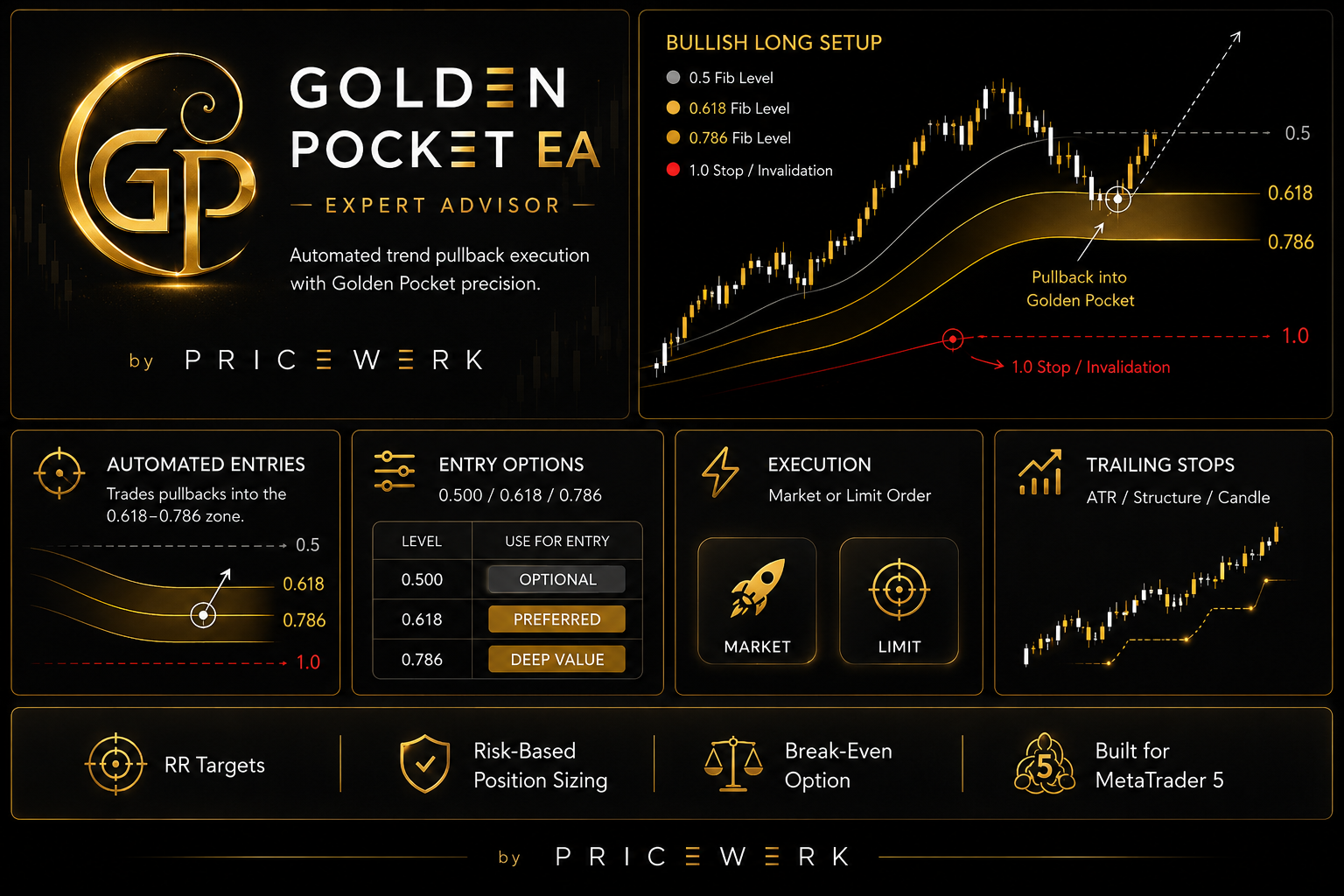
Summarizes the EA workflow: bullish pullback setup, 0.500/0.618/0.786 entry levels, stop-order sequence or market-touch execution, RR targets, risk-based sizing, partial close, break-even, and trailing stops.
Dynamic value zone
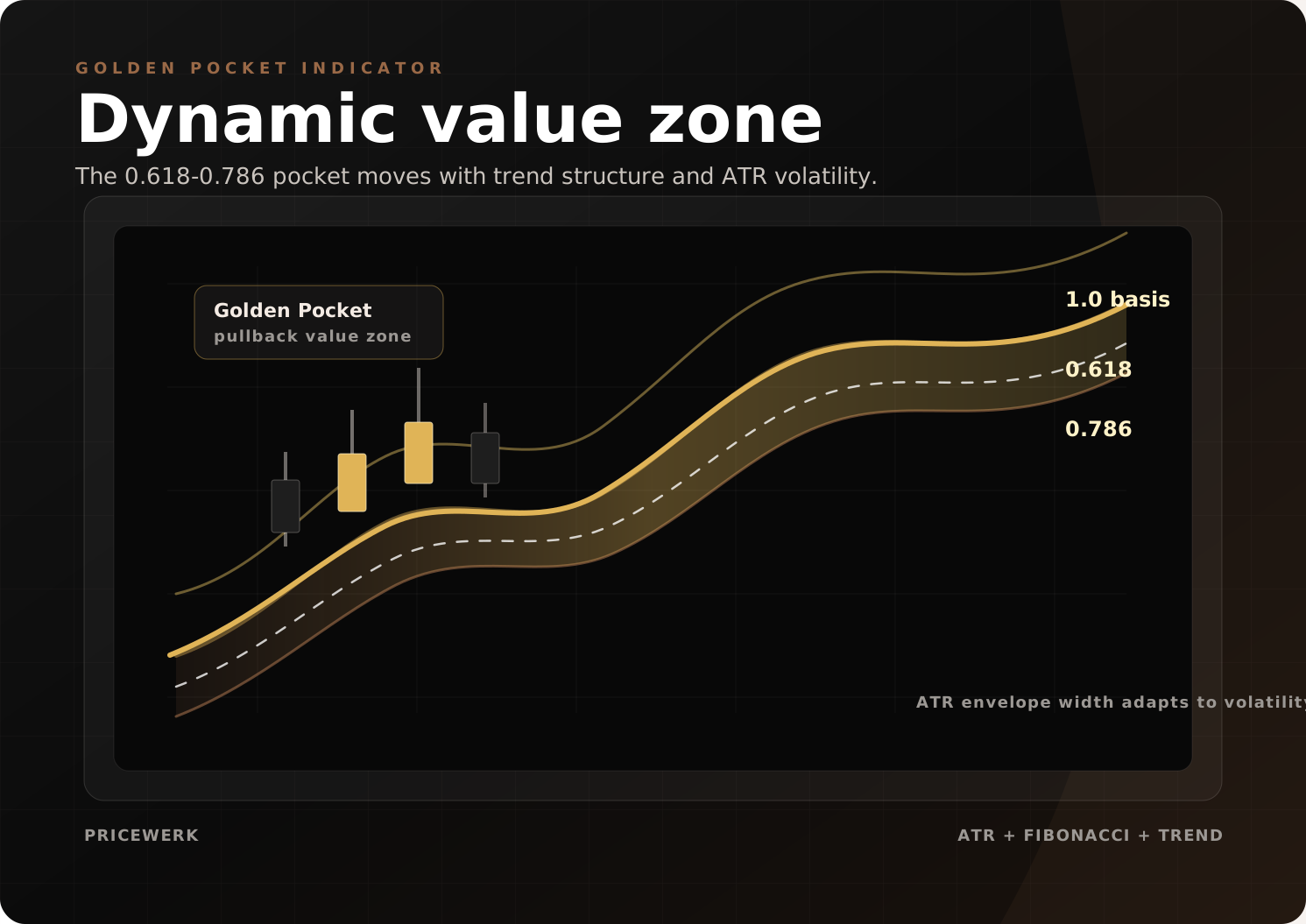
Shows how the 0.618-0.786 Golden Pocket is framed from ATR-adjusted trend envelopes before an automated entry becomes relevant.
Projection planning
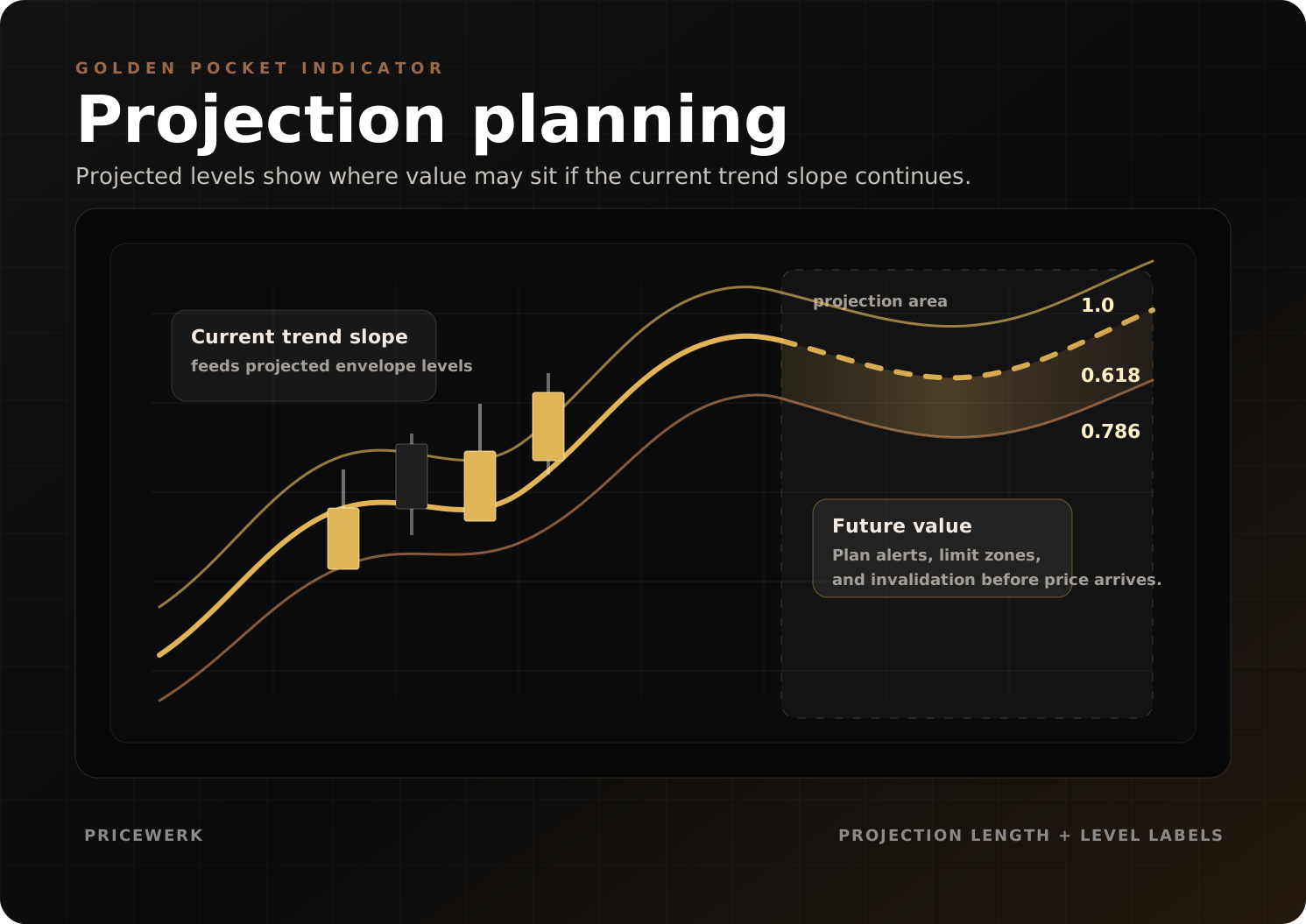
Shows projected envelope and Fibonacci levels so entry zones, invalidation, and pending-order behavior can be reviewed before price arrives.
Operating boundaries
Works well for
- Detecting the active trend with moving-average and ATR-based structure logic
- Evaluating a 0.5 break followed by a Golden Pocket touch before execution
- Keeping stop loss, target, partial close, break-even, trailing, cooldown, and trade filters inside one testable EA workflow
Limitations
- The published snapshot covers XAUUSD M30 v1.1 so far; other symbols, timeframes, sessions, and brokers still need independent testing
- ATR-Fibonacci trend models can fail during choppy, news-driven, or structurally broken markets
- Live results can differ from tests because of broker data, spread, commission, slippage, and execution
User must test
- Symbol, timeframe, moving-average settings, ATR settings, touch level, entry mode, and pending-order behavior
- Stop buffer, Risk:Reward target, partial close, break-even, trailing mode, cooldown, and position-sizing assumptions
- BacktestMode, stable tester entry logic, session, spread, higher-timeframe trend, open-position limits, Magic Number separation, and broker server time
Resources
Golden Pocket EA user manual
Installation notes, setup logic, key settings, testing workflow, and risk notes for the Golden Pocket EA.
- Format
- Version
- v1
- File
- 25 KB
Version historyv1.12026-05-27 · Golden Pocket EA v1.1
Golden Pocket EA v1.1
Added
- Added numbered input groups so MetaTrader settings are easier to scan and configure.
- Added
BacktestModeto disable EA-owned chart visuals, historical visual rendering, projections, and reference chart styling during Strategy Tester runs. - Added
UseBacktestStableEntryLogicfor Strategy Tester runs, using M1-bar sequence checks to make the 0.5-break and Golden Pocket target-touch flow more deterministic. - Added
UseLossCooldownandLossCooldownBarsto pause new entries for a configurable number of bars after a net losing exit. - Added loss-cooldown status feedback and logging so paused trading states are visible in the dashboard and journal.
Changed
- Changed default position sizing from fixed-lot execution to percent-risk execution with
RiskMode = RISK_PERCENT,RiskPercent = 1.0, andRiskBase = EQUITY. - Changed visual defaults to show chart levels, the Golden Pocket zone, entry/SL/TP levels, dashboard, trend markers, projections, and the Pricewerk reference chart style by default.
- Changed the default visual performance mode from
VISUAL_FASTtoVISUAL_BALANCED. - Changed new-trade gating to check configured open-position and pending-order limits before preparing a new setup.
- Changed one-trade-per-trend handling so it works alongside the configured maximum open-position limit.
- Changed pending-order invalidation at the structural 1.0 level to use current tick prices instead of the current bar range.
Improved
- Improved pre-trade validation by applying trade filters before entry preparation and resetting stale entry sequences when filters fail.
- Improved market-touch entries by revalidating the selected touch target immediately before placing a market order.
- Improved Strategy Tester performance and chart cleanliness by deleting EA-owned visual objects once
BacktestModeis active. - Improved setup-status colouring by highlighting cooldown states with the Golden Pocket colour.