
MT5 Expert Advisor
Pressure Box EA
Automates volatility-compression breakout setups in MetaTrader 5 by detecting tight Pressure Box ranges, confirming expansion, and applying structured entries, stops, targets, sessions, spread filters, and risk controls.

Fit check
Review fit, evidence, and next action.
Best for
- Automated volatility-compression breakout testing
- Confirmed expansion setups after tight box formation
Not for
- Blind live trading without Strategy Tester, demo, and broker-specific validation
- Random range breakouts without box quality and breakout confirmation
Evidence
Next step
- Platform
- MetaTrader 5
- Type
- Expert Advisor
- Access
- MQL5 Market
- Premium
- Version
- v1.1
- 28 May 2026
Performance evidence
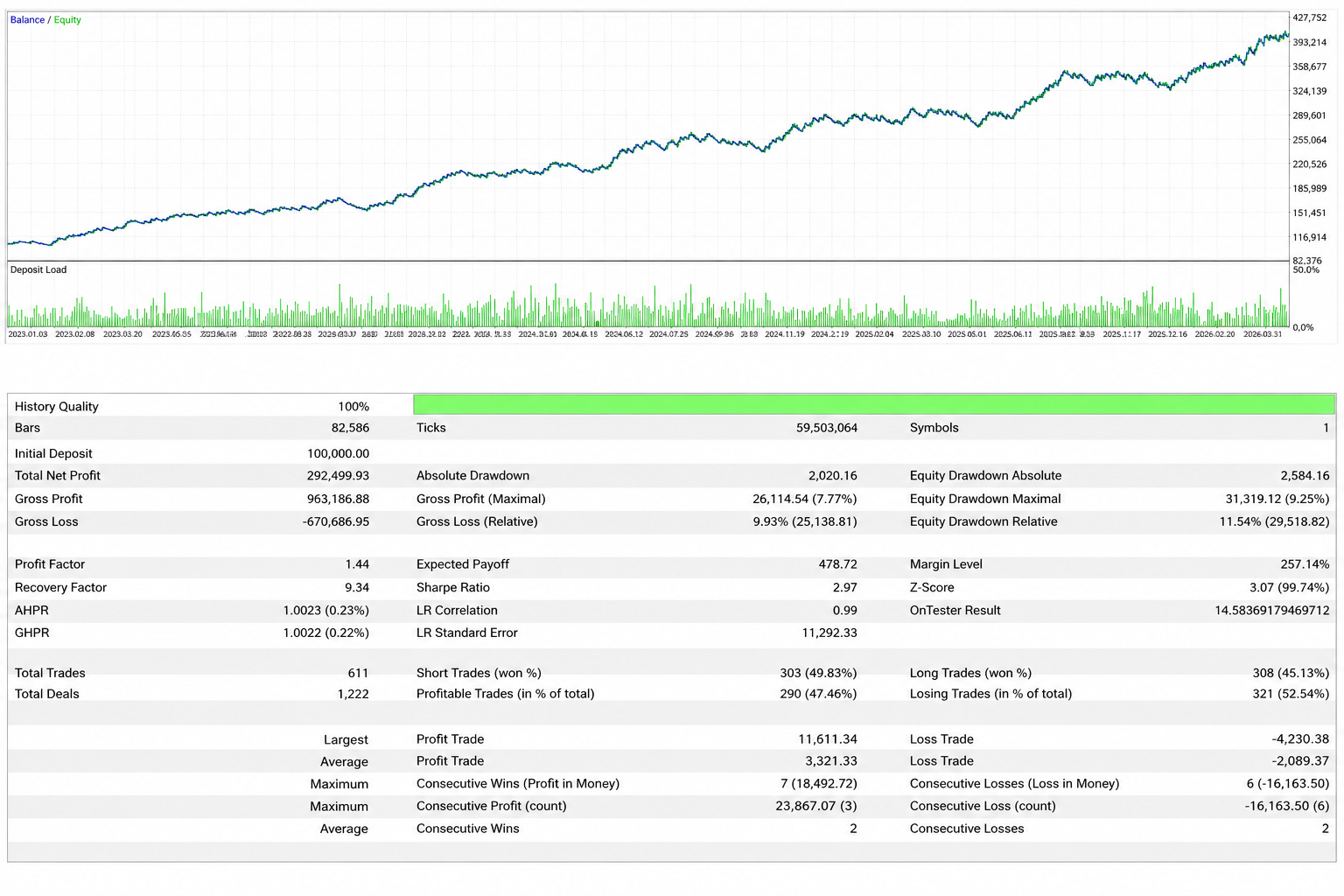
Strategy Tester evidence for linked setfiles. These snapshots document tested scenarios only; they are not live performance guidance.
Backtests
Linked setfiles, not live guidance.
- Return
- Net profit: 292,499.93
- +292.50%
- Max equity DD
- Maximal: 31,319.12
- 9.25%
- Win rate
- Profitable closed trades
- 47.46%
Return on initial deposit
Maximum equity drawdown
Strategy Tester metric
Test context
EURUSD M15, linked to one setfile.
- Symbol / TF
- EURUSD M15
- Test period
- 3 Jan 2023 to 31 Mar 2026
- 3 years 3 months
- Modelling
- 100% history quality
- Linked setfile
- Pressure Box EA EURUSD M15
- v1.1 · 2026-05-28
- Source
- MetaTrader 5 Strategy Tester screenshot
Testing assets
Linked setfiles are research baselines for the named symbol and timeframe. Treat them as starting points for Strategy Tester work, not live trading instructions.
Pressure Box EA EURUSD M15
EURUSD M15 v1.1 research baseline for testing Pressure Box compression-breakout logic with the linked Strategy Tester snapshot.
- Platform
- MetaTrader 5
- Asset
- EURUSD
- Timeframe
- M15
- Profile
- EURUSD M15 v1.1
v1.1 · 2026-05-28
v1.1
2026-05-28
5 KB
Optional legacy downloadsOlder versionsArchived baselines stay available here while the current v1.1 setfiles remain the primary downloads.1 file
Pressure Box EA EURUSD M15 v1.0
v1.0Legacy EURUSD M15 v1.0 starter configuration retained for users who still need the previous baseline.
- Platform
- MetaTrader 5
- Asset
- EURUSD
- Timeframe
- M15
- Profile
- Legacy EURUSD M15 v1.0
Pressure Box EA automates a compression-breakout workflow in MetaTrader 5. It defines a compact box, checks whether the breakout has measurable quality, and then applies entry, stop, target, spread, session, exposure, and risk rules.
The tool is not a general range robot. It is built for testing whether a specific compression structure can expand with enough quality to justify automation.
Market model
Markets often move from contraction to expansion. A Pressure Box is a compact price structure where range and volatility compress. The model becomes interesting only when price leaves that structure with enough confirmation.
Compression does not guarantee expansion. A range can continue, breakouts can fail, and news or thin liquidity can distort the setup. The EA narrows the question: did price build a box that meets the configured quality rules, and did the breakout meet the expansion rules?
What the EA controls
Pressure Box EA controls box lookback, minimum and maximum box bars, ATR relation, average-range limits, candle-body behavior, close behavior, range cleanliness, breakout distance, candle quality, volume confirmation, entry mode, stop model, target model, spread, session, risk, exposure, dashboard, diagnostics, and CSV logging.
Version 1.1 also treats open positions and pending orders as combined managed exposure. When the configured exposure slot is occupied, the EA pauses new scans and keeps the active trade context visible on the chart.
Setup evaluation
The first layer is box formation. The EA scans for a narrow structure that is compact enough to be meaningful for the selected symbol and timeframe.
The second layer is breakout confirmation. A valid breakout should show more than a small touch outside the box. The EA can require a close outside the range, minimum breakout distance, breakout candle range, body size, close-position quality, optional volume confirmation, and minimum planned risk-reward.
The third layer is entry style. Breakout-close, stop-order, and retest-limit entries create different execution profiles. Each should be tested separately before combining assumptions.
The fourth layer is management. Stops can sit behind the box, behind the breakout candle, or use ATR logic. Targets can use fixed risk-reward, box-range multiples, or ATR distances. Break-even, trailing, drawdown brake, and session controls change both risk and frequency.
Configuration workflow
Start with the box settings. Review lookback, box size, ATR relation, average range, candle-body limits, close behavior, and minimum compression score until the detected structures make sense.
Then tune breakout confirmation. Test candle close, minimum breakout distance, candle range, body size, close position, volume filter, and minimum RR one group at a time.
Only after that should entry mode and management be optimized. Stop placement and target logic change the full risk-reward shape, so they should not be tuned before the box and breakout rules are stable.
Risk settings need their own pass. Risk percent, maximum risk, daily trade count, combined open-position and pending-order exposure, spread filter, session window, pending-order expiration, drawdown brake, break-even, trailing, and broker stop-distance rules can all change the result.
Evidence and testing limits
The page links the EURUSD M15 v1.1 setfile, manual, MQL5 listing, changelog, and one Strategy Tester screenshot for the same setfile. The snapshot documents one specific tested scenario.
Use that scenario as a baseline, not a live setting. Confirm symbol specification, point size, tick value, commission, spread, slippage, server time, and session mapping before comparing results. Optimize in order: box detection, breakout confirmation, entry mode, stop and target logic, risk controls, then management.
Avoid tuning everything at once. A strong-looking backtest can become fragile when many parameters are forced into a narrow range. Use out-of-sample periods, higher spread assumptions, worse slippage, and demo execution before live risk.
When not to use it
Avoid blind live deployment, news conditions, unstable spreads, low-liquidity sessions, untested symbols, and broker environments with unclear stop-distance or execution rules.
Be cautious when boxes form inside messy chop or when a larger trend is already extended. Pressure Box EA can make compression-breakout rules consistent. It cannot make expansion predictable or replace market selection, risk limits, and account rules.
Key parameters
Configure these settings before live use. Review each group on the exact symbol, timeframe, broker, and account rules you intend to test.
| Setting | What to configure |
|---|---|
| Pressure Box detection | Configure lookback, minimum and maximum box bars, ATR relation, average-range limits, candle-body behavior, close behavior, and compression score. |
| Breakout confirmation | Require a close outside the box, minimum breakout distance, candle range, body size, close-position quality, optional volume filter, and minimum RR. |
| Entry mode | Test breakout close entries, stop orders above or below the box, or retest limit entries near the broken boundary. |
| Stop and target model | Use stops behind the box, behind the breakout candle, or ATR-based logic, then compare fixed RR, box-range, and ATR target models. |
| Risk and trade limits | Review risk percent, maximum risk, daily trade count, combined open-position and pending-order exposure, spread filter, session filter, pending-order expiration, and drawdown brake. |
| Management and logging | Test break-even, trailing stop, dashboard display, visual objects, Journal diagnostics, and CSV trade logging separately before combining them. |
Operating boundaries
Works well for
- Detecting compact Pressure Box structures before a breakout becomes relevant
- Filtering weak breakouts with close, distance, body, range, volume, and minimum RR checks
- Keeping entries, stops, targets, exposure limits, sessions, spread, trade management, active-trade overlays, and logging inside one testable EA workflow
Limitations
- The published snapshot covers EURUSD M15 v1.1 so far; other symbols, timeframes, sessions, and brokers still need independent testing
- Compression-breakout models can fail during noisy ranges, news-driven spikes, or poor-liquidity sessions
- Live results can differ from tests because of broker data, spread, commission, slippage, and execution
User must test
- Symbol, timeframe, box lookback, box size, ATR relation, candle behavior, and compression score
- Breakout close, distance, candle range, body size, volume filter, entry mode, and minimum risk-reward
- Stop model, target model, risk percent, session window, spread, daily trade limits, drawdown brake, and broker server time
Resources
Pressure Box EA user manual
Installation notes, Pressure Box setup logic, entry modes, stop and target models, risk controls, logging, and testing workflow.
- Format
- Version
- v1
- File
- 28 KB
Version historyv1.12026-05-27 · Pressure Box EA v1.1
Pressure Box EA v1.1
Added
- Added combined exposure handling through open positions plus pending orders for the current symbol and
MagicNumber. - Added an exposure-slot check before new signal scanning so the EA waits when
MaxOpenPositionsis already reached. - Added persistent active-trade drawings for pending orders and open positions, including the originating pressure box, entry, SL, TP, direction, RR, and lot size.
- Added stored pressure-box context to trade records so active trade overlays can remain visible after the live setup scan is cleared.
- Added order-cancel, order-expiry, and order-rejection handling to close inactive trade records and refresh active-trade drawings.
Changed
- Changed
MaxOpenPositionssemantics to limit total managed exposure, not only open positions. - Changed live setup drawings to use the
PPB_LIVE_prefix and active trade drawings to use the separatePPB_TRADE_prefix. - Changed signal scanning to pause and clear transient setup drawings while an active position or pending order is occupying the exposure slot.
- Changed executed trade-plan visual handling so temporary setup objects are removed and replaced by persistent active-trade overlays.
- Changed active trade records to update from actual deal data after entry, including fill price, volume, entry time, equity, and initial risk.
Improved
- Improved chart clarity by keeping active trade context visible while new box scans are paused or refreshed.
- Improved dashboard and journal diagnostics by using the same combined exposure count throughout the EA.
- Improved cleanup compatibility by retaining legacy
PPB_DRAW_object cleanup while moving new objects to the split live/trade prefixes. - Improved documentation for visual object behaviour and the new exposure handling model.