
MT5 Expert Advisor
Continuum VWAP EA
Targets VWAP trend-continuation trades by waiting for directional bias, a controlled pullback toward Main VWAP or Band 1, and configured execution checks.

Fit check
Review fit, evidence, and next action.
Best for
- Understanding and testing VWAP trend-continuation logic
- Pullback entries toward the Main VWAP or Band 1
Not for
- Countertrend reversal trading or random VWAP-touch entries
- Users who want a plug-and-play signal robot without testing
Evidence
Next step
- Platform
- MetaTrader 5
- Type
- Expert Advisor
- Access
- MQL5 Market
- Premium
- Version
- v1.0
- 15 May 2026
Performance evidence
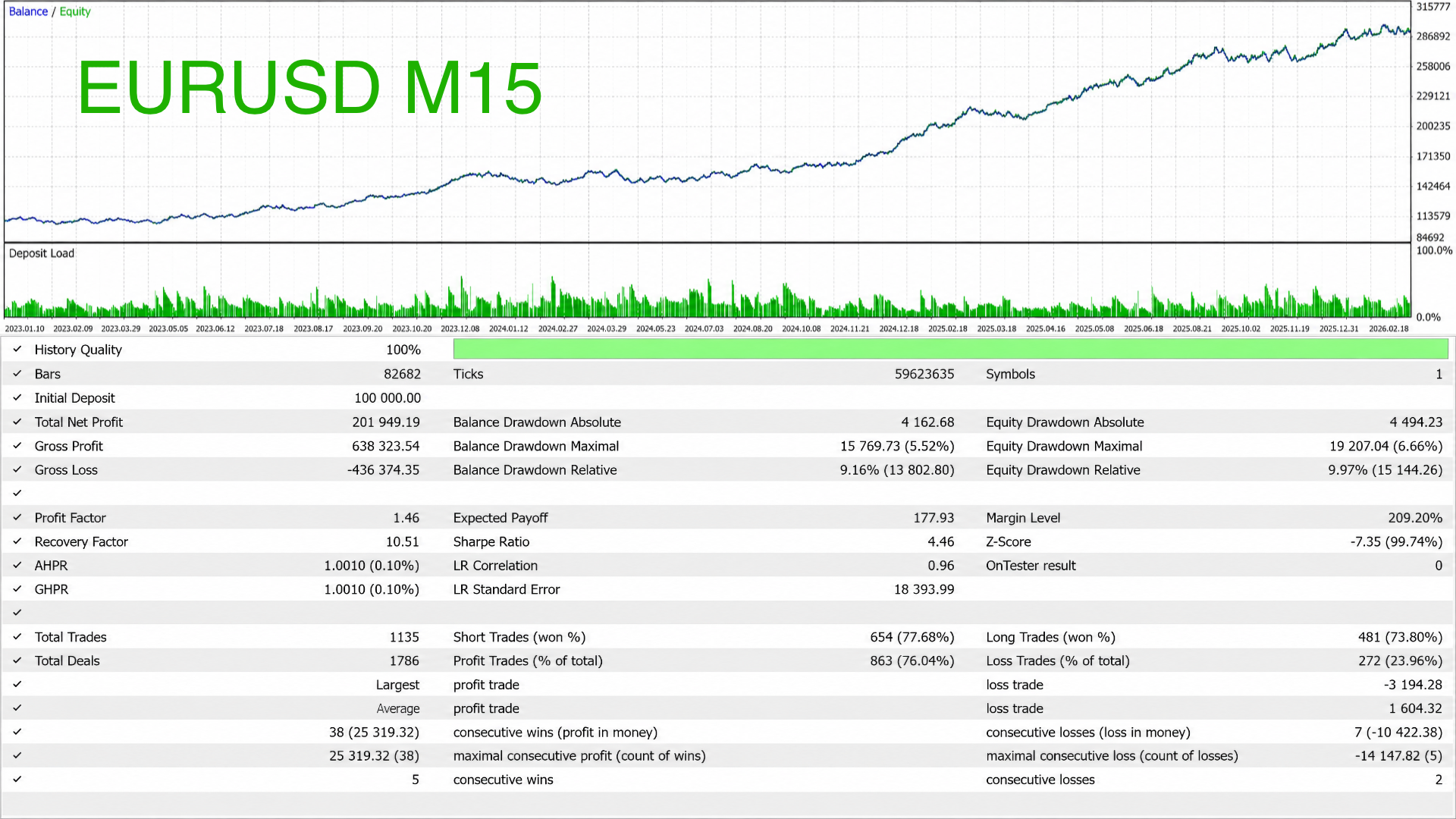
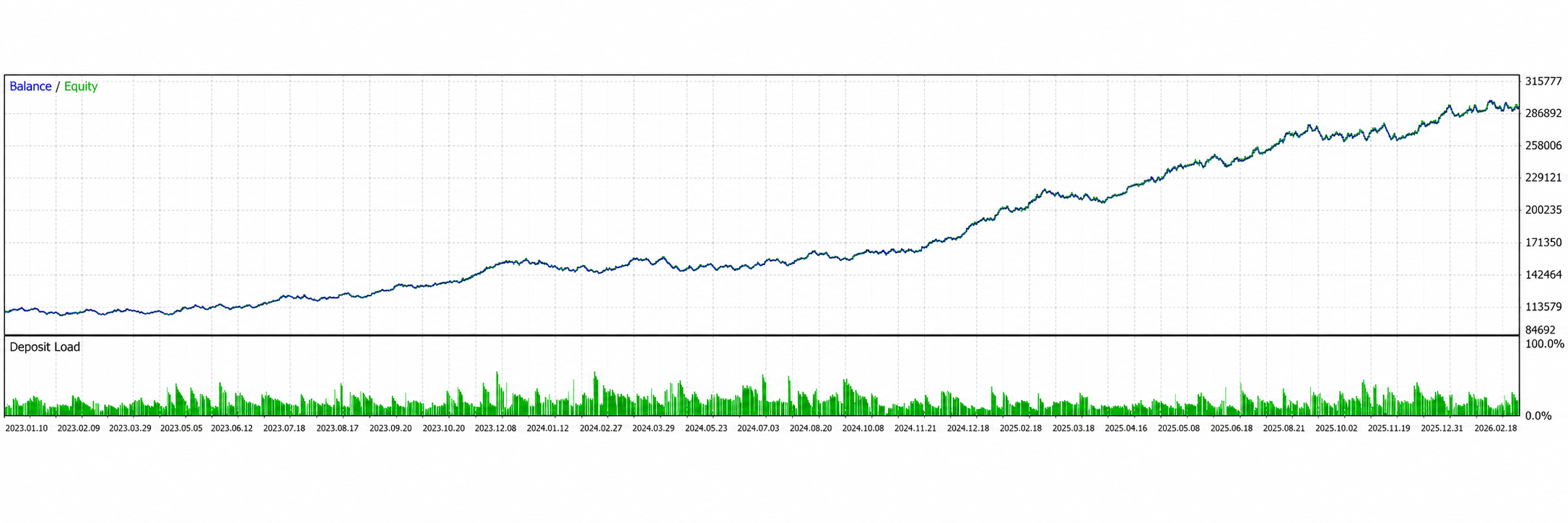
Strategy Tester evidence for linked setfiles. These snapshots document tested scenarios only; they are not live performance guidance.
Backtests
Linked setfiles, not live guidance.
- Return
- Net profit: 201,949.19
- +201.95%
- Max equity DD
- Absolute: 19,207.04
- 6.66%
- Win rate
- Profitable closed trades
- 76.04%
Return on initial deposit
Maximum equity drawdown
Strategy Tester metric
Test context
EURUSD M15, linked to one setfile.
- Symbol / TF
- EURUSD M15
- Test period
- 10 Jan 2023 to 18 Feb 2026
- 3 years 1 month
- Modelling
- 100% history quality
- Linked setfile
- Continuum VWAP EA EURUSD M15
- v1.0 · 2026-05-15
- Source
- MT5 Strategy Tester screenshot
Testing assets
Linked setfiles are research baselines for the named symbol and timeframe. Treat them as starting points for Strategy Tester work, not live trading instructions.
Continuum VWAP EA EURUSD M15
EURUSD M15 starter configuration for testing the Continuum VWAP EA with the published Strategy Tester snapshot.
- Platform
- MetaTrader 5
- Asset
- EURUSD
- Timeframe
- M15
- Profile
- EURUSD M15 v1
v1.0 · 2026-05-15
v1.0
2026-05-15
7 KB
Continuum VWAP EA XAUUSD M15 Weekly TC
XAUUSD M15 weekly-VWAP trend-continuation starter configuration for testing the Continuum VWAP EA with the published Strategy Tester snapshot.
- Platform
- MetaTrader 5
- Asset
- XAUUSD
- Timeframe
- M15
- Profile
- XAUUSD M15 Weekly TC v1
v1.0 · 2026-05-15
v1.0
2026-05-15
7 KB
Continuum VWAP EA automates a specific trend-continuation workflow in MetaTrader 5. It identifies directional VWAP context, waits for a controlled pullback toward Main VWAP or Band 1, and then applies execution, stop, target, session, spread, and risk checks.
The tool does not trade every VWAP touch. It first asks whether price has already moved away from the correct band area. Only then can a pullback toward VWAP become a testable continuation setup.
Market model
VWAP is a dynamic fair-value reference for the selected anchor period. It helps show whether price is trading above, below, or around accepted value.
VWAP by itself is too broad for automation. A Main VWAP touch can be continuation, mean reversion, chop, or noise. Continuum narrows the question: did price first extend directionally away from a VWAP band area, then pull back into a defined entry zone with acceptable execution quality?
For long setups, the model looks for strength followed by a pullback toward Main VWAP or the upper Band 1 area. For shorts, the structure is mirrored. The goal is not to catch every VWAP reaction. The goal is to test continuation after a defined path.
What the EA controls
Continuum controls VWAP anchor mode, reset timing, volume source, band multipliers, entry zone, prior-band requirements, touch tolerance, VWAP slope, candle-size filters, maximum entry distance, minimum risk-reward, stops, targets, partial close, break-even, trailing, sessions, spread, cooldown, and daily risk rules.
That makes weak results easier to diagnose. If a setup fails testing, the trader can inspect whether the issue comes from anchor choice, band distance, prior-band path, stop model, target logic, or session assumptions.
Setup evaluation
The first layer is anchor context. Daily VWAP may fit intraday M15 work. Weekly VWAP can fit broader M30 continuation behavior. Reset time must match the market and broker server time.
The second layer is path. A Main VWAP setup can require a prior move into the matching Band 1 area. A Band 1 setup can require a prior move into Band 2. This prevents the EA from treating random VWAP touches as setups.
The third layer is execution quality. Touch tolerance, approach side, VWAP slope, signal candle size, maximum entry distance, spread, and minimum risk-reward decide whether the pullback remains usable. Trade management comes after those checks.
Configuration workflow
Start with VWAP_Anchor_Mode, reset time, volume source, and Band 1 and Band 2 multipliers. For Forex and CFDs, tick volume is usually the practical source, but broker data quality still matters.
Then configure the path: Trend_Entry_Zone, prior Band 1 or Band 2 requirements, lookback windows, touch tolerance, and VWAP slope. Loose settings can react to noise. Strict settings can miss valid pullbacks.
Next test stop and target logic. VWAP hybrid stops keep the risk model close to the structure. Fixed risk-reward targets are easier to compare during optimization. VWAP targets keep the exit tied to band logic. Partial close, break-even, and trailing should be tested separately before being combined.
Finally, review risk and session controls. Maximum daily loss, maximum trades per day, open-position limits, spread, cooldown, Monday handling, close time, and Friday behavior can change both risk and trade frequency.
Evidence and testing limits
The page links EURUSD M15 v1 and XAUUSD M15 Weekly TC v1 setfiles with published Strategy Tester snapshots. They document specific historical tests, modelling quality, result metrics, and source screenshots for those exact setfiles.
Use them as baselines, not live instructions. Test one symbol, one timeframe, and one VWAP anchor at a time. Confirm broker server time, session, tick size, tick value, commission, spread, and stop-distance rules before comparing settings.
Do not optimize every setting together. A stable setfile should remain understandable when tested with higher spread, worse slippage, and out-of-sample periods. Demo validation belongs between Strategy Tester work and live risk.
When not to use it
Continuum is not a countertrend reversal tool. Do not use it as a simple "price touched VWAP" entry system. Avoid blind live deployment, news-heavy conditions, unstable spreads, untested symbols, and unclear broker server-time alignment.
The EA can make VWAP continuation rules consistent. It cannot make continuation predictable or replace market selection, risk limits, and account rules.
Key parameters
Configure these settings before live use. Review each group on the exact symbol, timeframe, broker, and account rules you intend to test.
| Setting | What to configure |
|---|---|
| VWAP anchor and bands | Choose daily or weekly VWAP anchors, reset time, volume source, and standard-deviation band multipliers. |
| Entry zone and prior-band logic | Control whether entries are allowed at Main VWAP, Band 1, or both, and require the matching prior Band 1 or Band 2 touch. |
| Touch tolerance and slope filter | Use ATR-based touch tolerance, approach-side checks, VWAP slope, signal-candle size, and minimum RR to filter entry quality. |
| Risk and trade limits | Set fixed lot, percent risk, or fixed money risk, then cap daily loss, daily trade count, open positions, and spread. |
| Stops, targets, and management | Use structural VWAP hybrid stops, ATR stops, VWAP targets, fixed RR, partial close, break-even, or optional trailing. |
| Session and visual controls | Limit trading by broker-time sessions, Monday and Friday handling, daily close behavior, dashboard display, and tester visuals. |
Visual context
Product visuals show the chart logic, zones, and workflow context behind the reference. They are explanatory material, not performance evidence.
How the strategy works
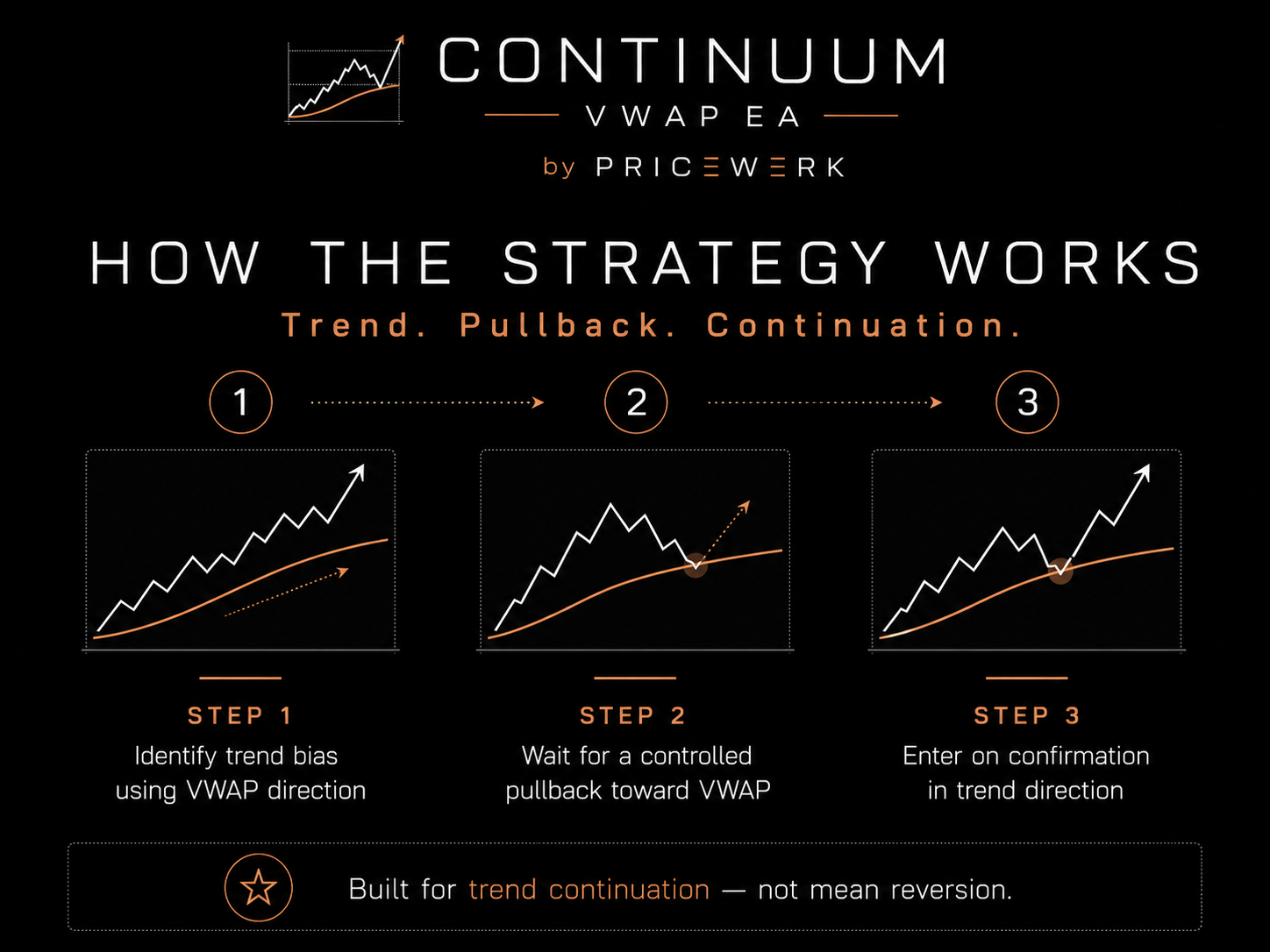
Shows the Continuum sequence: dominant trend first, controlled VWAP pullback second, continuation confirmation third.
Key features
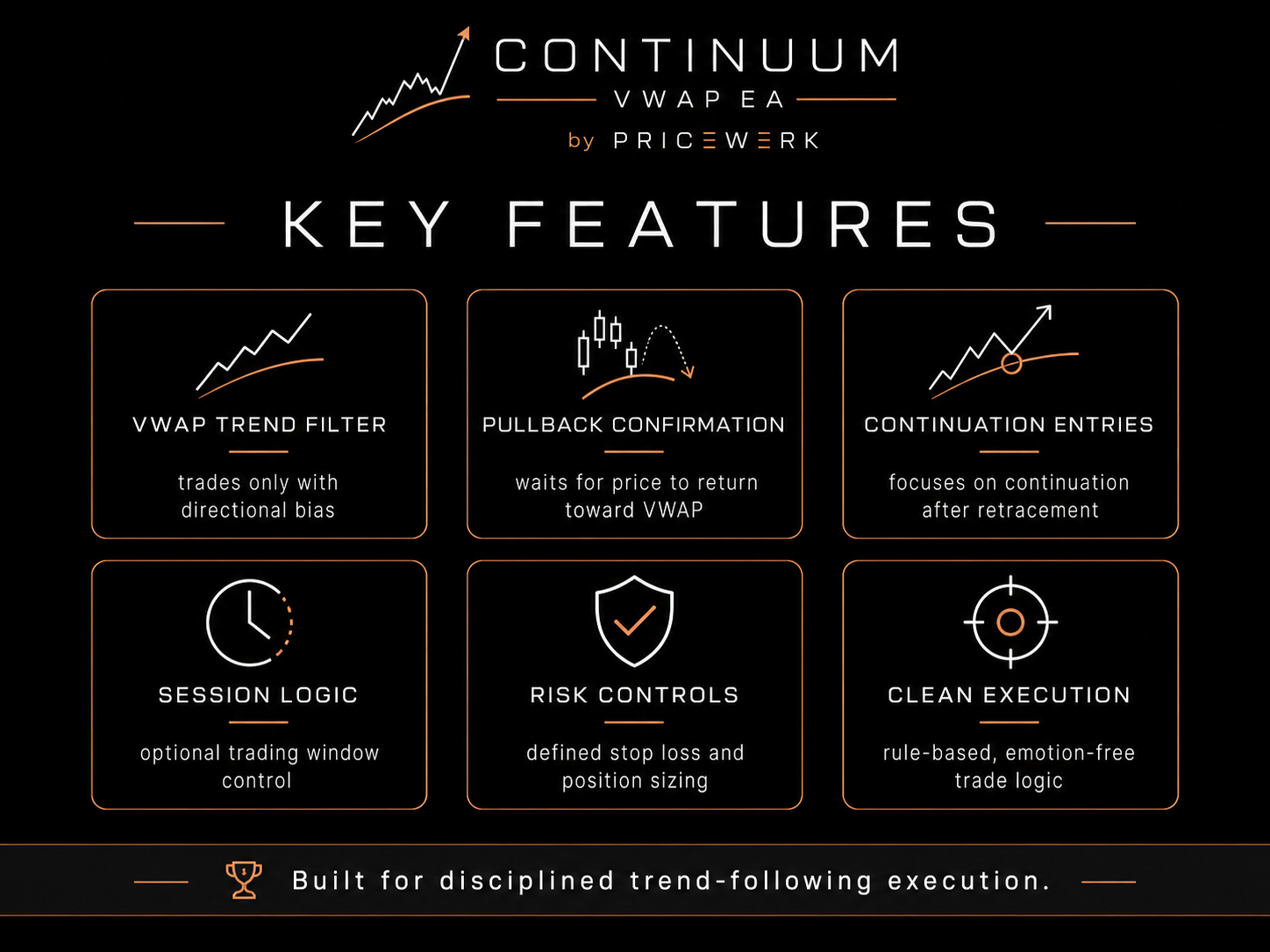
Summarizes the EA's VWAP anchor, trend-continuation model, pullback entries, risk controls, session filters, and clean chart display.
VWAP chart context
Shows Continuum's chart view with VWAP bands, trend-continuation labels, dashboard state, and managed trade levels.
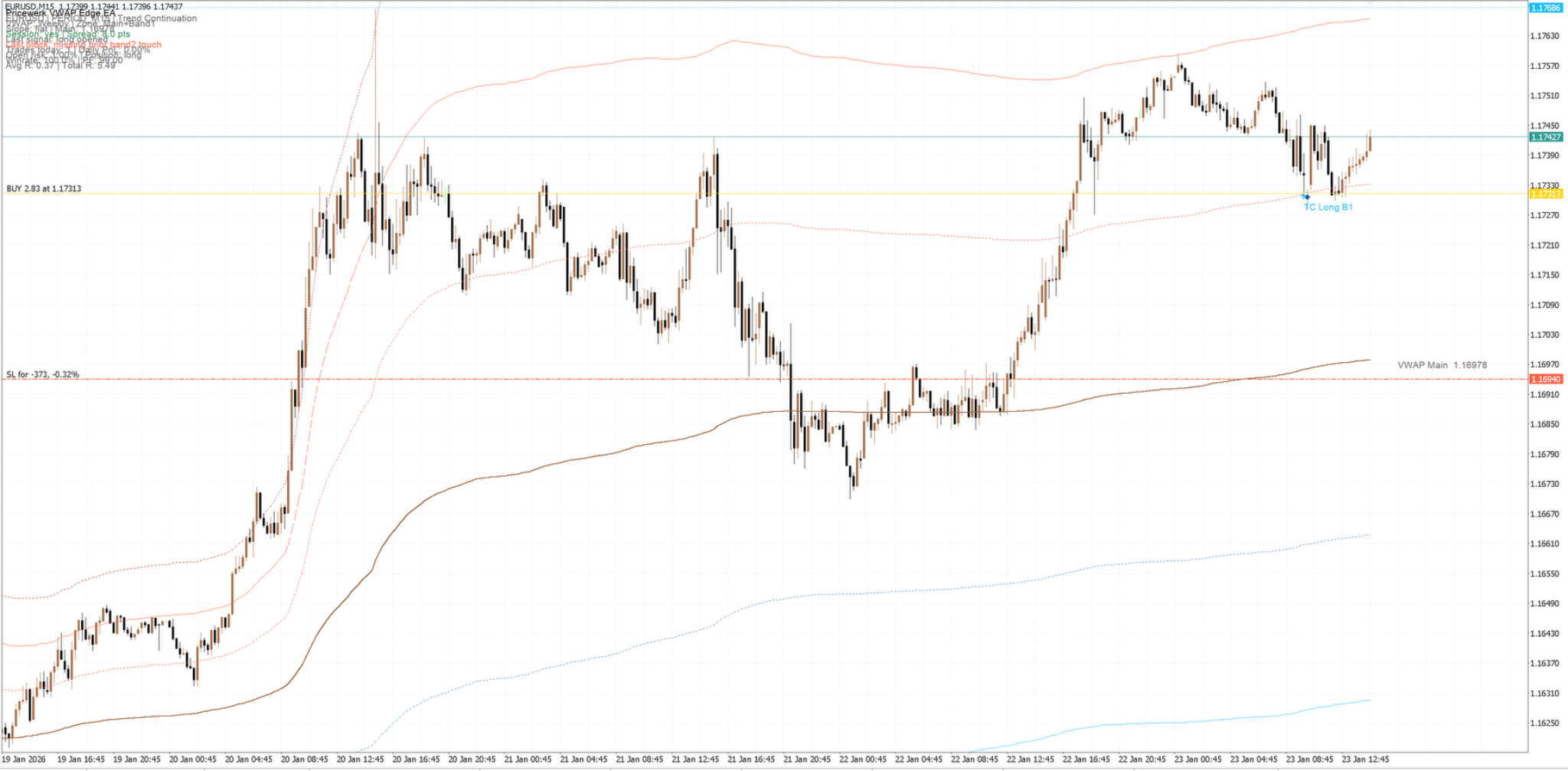
Execution view
Displays the EA in MT5 with VWAP continuation context, visual levels, and dashboard information for review.
Operating boundaries
Works well for
- Separating real trend-continuation context from random VWAP touches
- Waiting for a controlled pullback before evaluating a continuation entry
- Combining risk, daily loss, session, spread, and trade-frequency filters in one EA
Limitations
- The EA depends on correct VWAP anchor, reset time, and broker server-time alignment
- Trend-continuation systems can struggle during choppy, directionless, or news-driven markets
- The published snapshots cover EURUSD M15 and XAUUSD M15 so far; other symbols, sessions, and brokers still need independent testing
User must test
- Daily vs. weekly VWAP anchor, bands, touch tolerance, and slope requirements
- Symbol-specific spread, commission, slippage, session windows, and broker distance rules
- Daily loss, open-position, trade-count, stop, target, and management settings
Resources
Continuum VWAP EA user manual
Installation notes, VWAP calculation, entry logic, complete settings, setfile families, Strategy Tester workflow, troubleshooting, and risk notice for the Continuum VWAP EA.
- Format
- Version
- v1.0
- File
- 25 KB