
MT5 Indicator
Turtle Soup Indicator
A manual MetaTrader 5 signal and trade-planning indicator for Turtle Soup sweep-and-reclaim setups, with auto calibration, smart presets, and signal quality statistics.

Fit check
Review fit, evidence, and next action.
Best for
- Calibration-first Turtle Soup review
- Structure-liquidity sweep detection
Not for
- Placing trades, managing stops, or enforcing account risk automatically
- Reusing version 1.x presets without reviewing and recreating them after the v2.0 input redesign
Evidence
Next step
- Platform
- MetaTrader 5
- Type
- Indicator
- Access
- MQL5 Market
- Premium
- Version
- v2.0
- 27 May 2026
Visual context
Product visuals show the chart logic, zones, and workflow context behind the reference. They are explanatory material, not performance evidence.
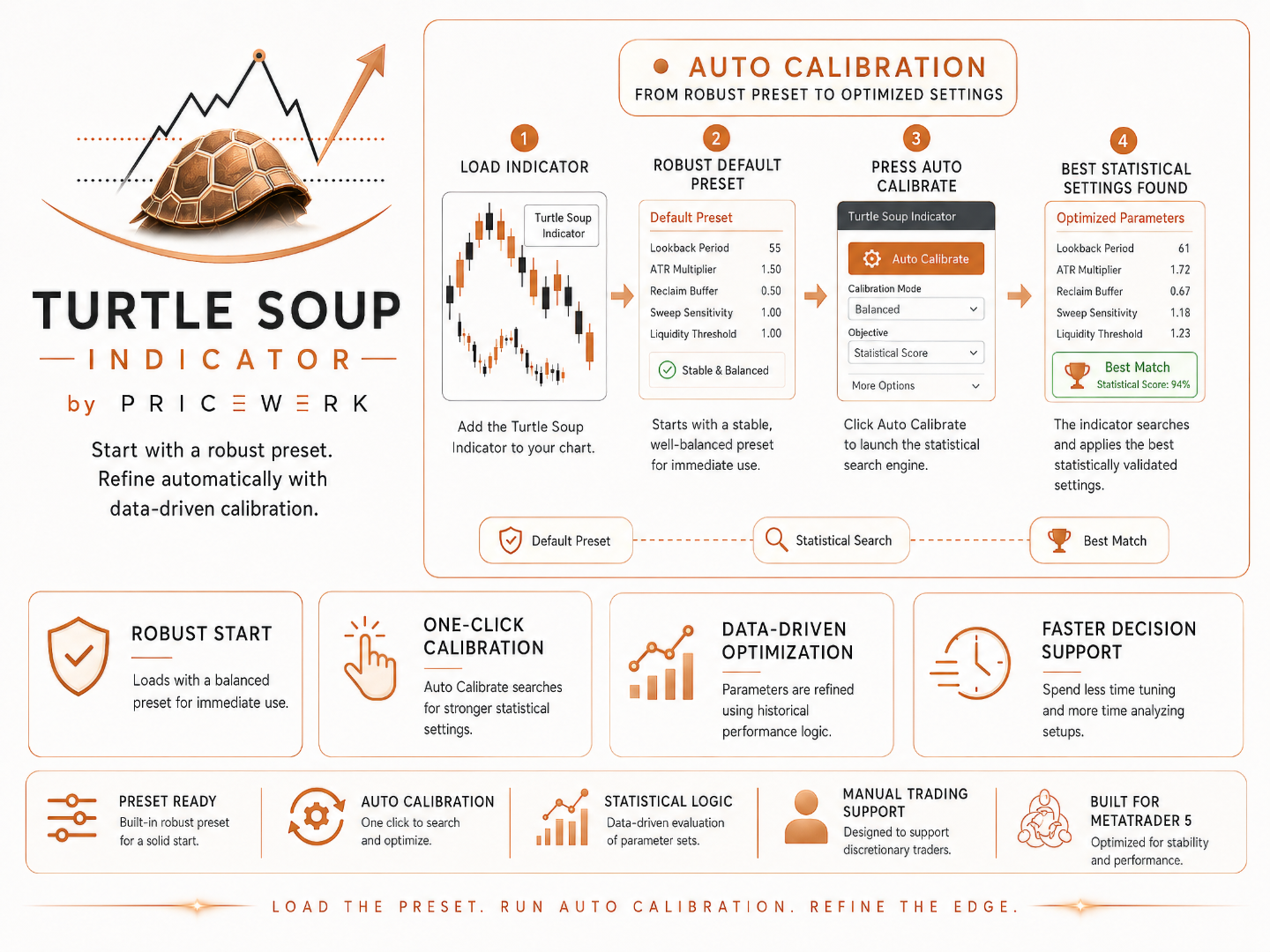
Auto Calibration Workflow
Shows the v2.0 flow from robust preset to calibrated settings, using smart defaults, statistical search, and best-match parameter selection.
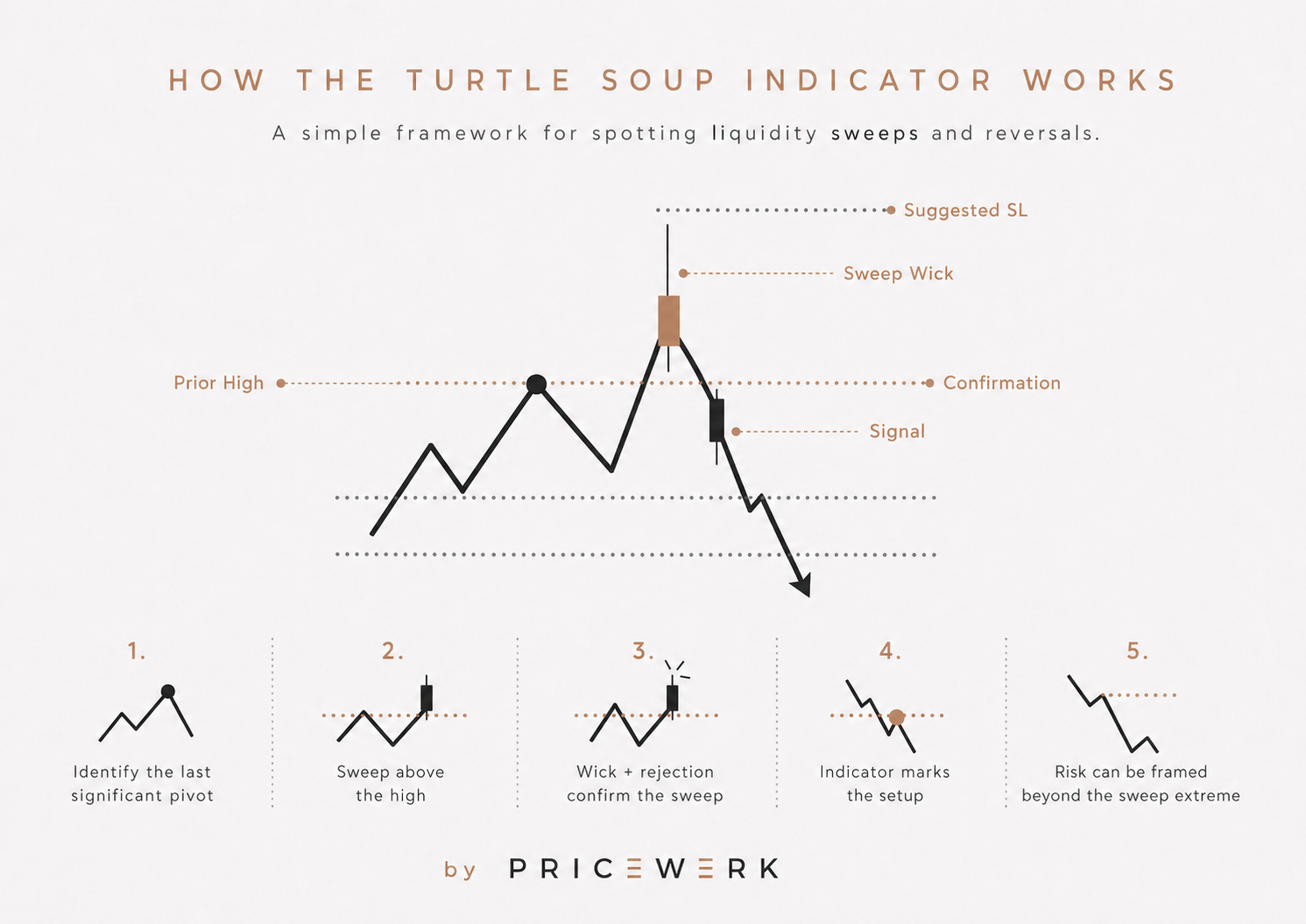
How the Indicator Works
Shows the core Turtle Soup sequence from prior structure and sweep wick to reclaim confirmation, signal, and risk framing.
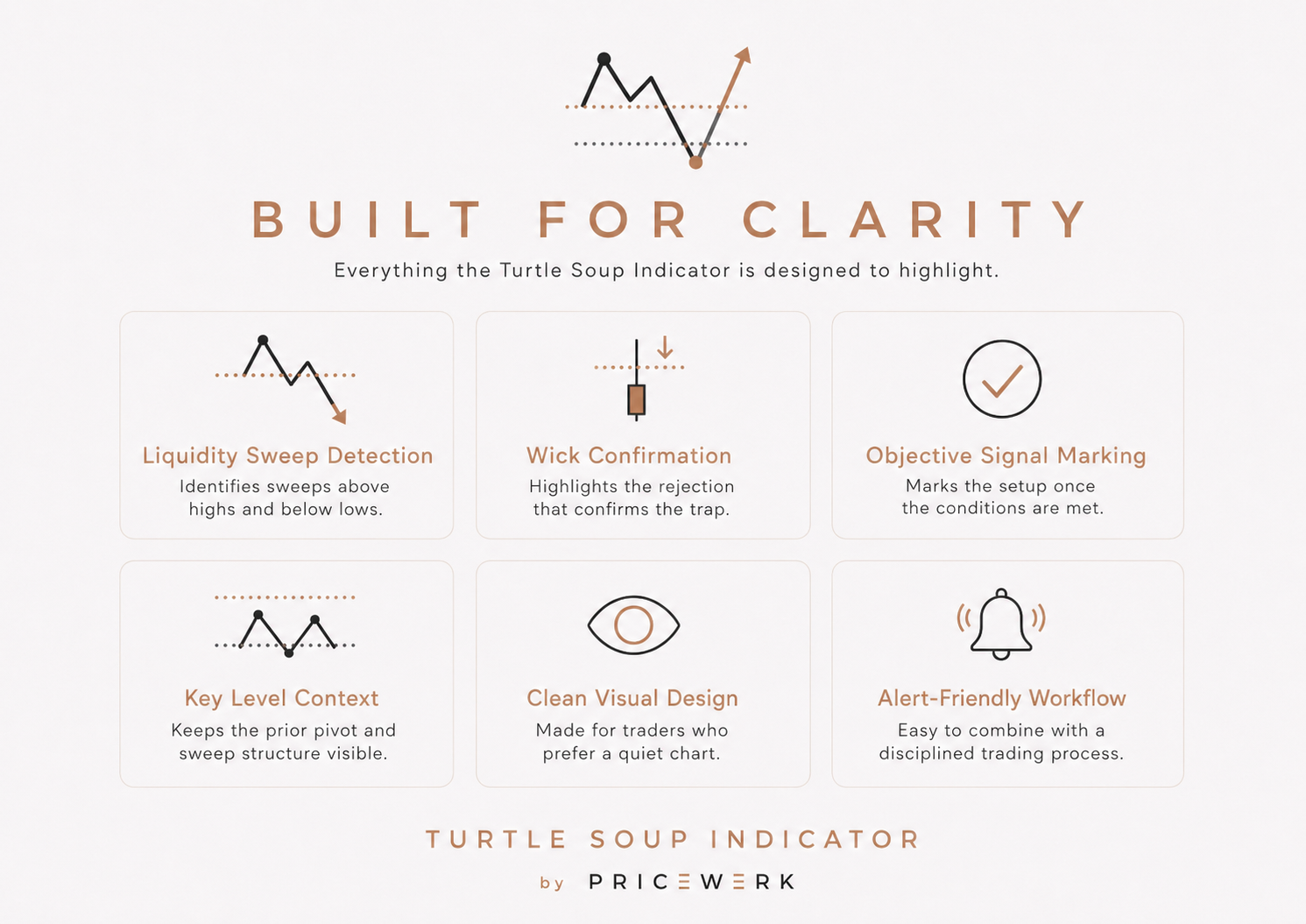
Built for Clarity
Summarizes the indicator's visual focus: sweep detection, wick confirmation, signal marking, level context, chart clarity, and alert support.
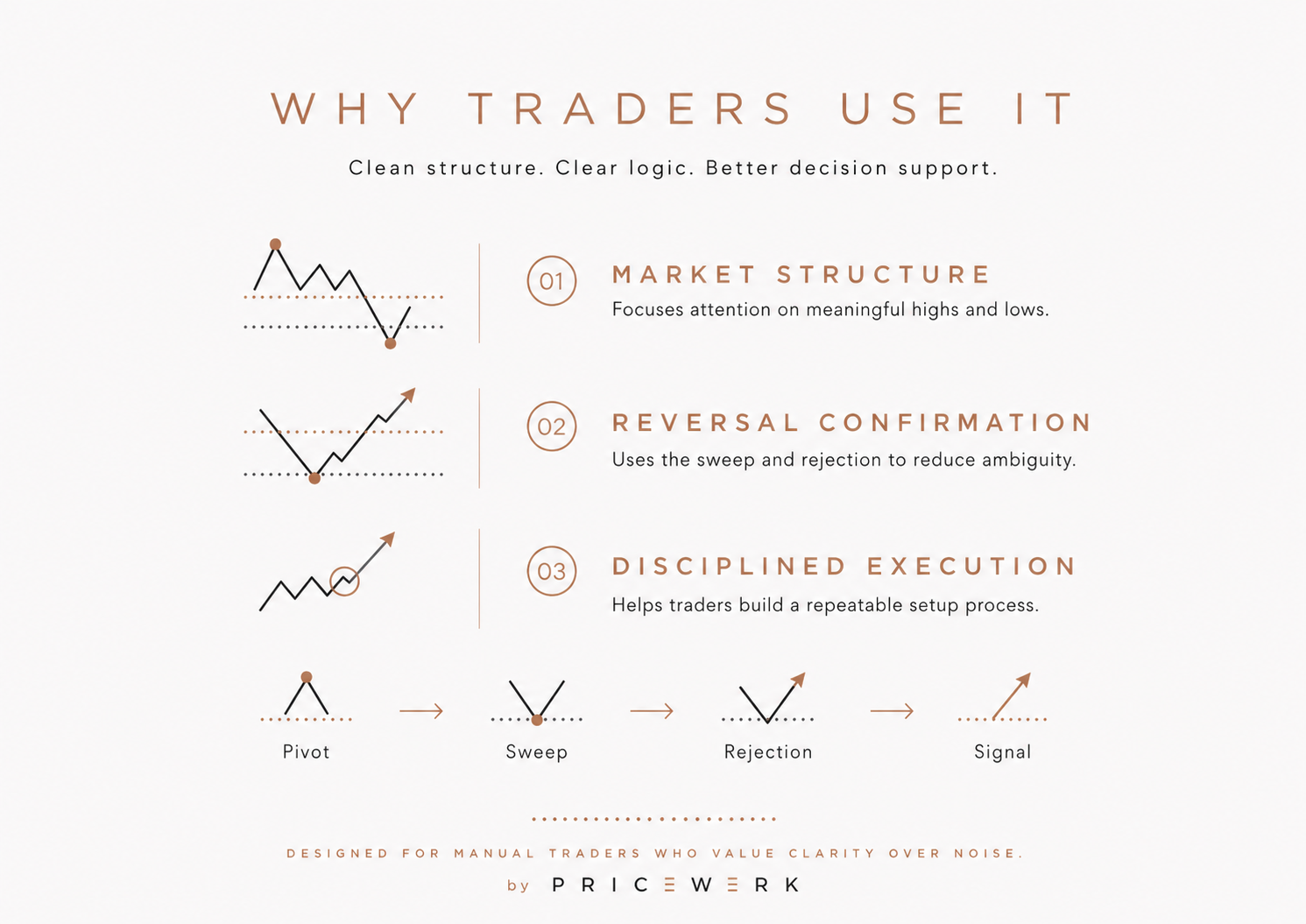
Why Traders Use It
Frames the indicator as decision support for market structure, reversal confirmation, and a repeatable manual trading process.
Turtle Soup Indicator v2.0 makes a manual sweep-and-reclaim workflow visible on a MetaTrader 5 chart. It marks structure-liquidity levels, waits for a sweep and reclaim, and draws a manual trade plan with entry, stop loss, TP1, TP2, and TP3.
Execution remains manual. Calibration, presets, statistics, alerts, and exported signal variables are analysis tools. They do not place orders, manage risk, or make a setup safe.
Important upgrade note
Version 2.0 is a breaking update for existing indicator presets. The input menu was rebuilt around Auto Calibration, Result Quality, Display, and Alerts & Export.
Version 1.x .set files and manually saved presets may not map cleanly to the v2.0 input surface. Review settings after updating and recreate presets instead of assuming the old configuration still describes the same behavior.
Older alternate entry modes and spread-filter inputs were removed. Manual trade plan entries are now based on the reclaim close.
Market model
Turtle Soup is a false-breakout model. It starts with a relevant high or low, then watches whether price sweeps that level and returns back into prior structure.
A sweep is not a command to trade. A strong trend, news candle, thin liquidity, poor spread, or weak reference level can make a clean-looking setup fail. The indicator exists to make structure, reclaim, and trade plan context visible before a manual decision is made.
What changed in v2.0
The indicator now starts from smart market presets and a built-in preset bank for Gold, Nasdaq, DAX, Bitcoin, EURUSD, GBPUSD, and USDJPY across supported intraday and swing timeframes.
The default reference workflow is Structure Liquidity. Instead of treating every minor pivot equally, the indicator scores structure levels, checks displacement, reviews retest context, and focuses the chart on stronger sweep candidates.
Auto calibration can fine-tune around the active preset. It evaluates profile variants with signal count, TP1 win rate, AvgR, profit factor, max drawdown, recovery, stability, losing streaks, and out-of-sample behavior. If no profile is clearly better, keeping the preset can be the better result.
Setup evaluation
The first layer is the structure-liquidity reference level. The indicator looks for a high or low with enough context to be monitored.
The second layer is the sweep. Price must trade beyond that level, but the breakout can still continue.
The third layer is the reclaim close. In v2.0, the manual trade plan is based on that reclaim close rather than the removed alternate entry modes.
The fourth layer is quality context. Entry, stop loss, TP1, TP2, TP3, sweep level, status text, guidance, and recent signal statistics support review. They do not replace execution rules.
Configuration workflow
Start with smart presets. Keep UseSmartMarketPreset and UseBuiltinPresetBank enabled unless there is a clear reason to override them.
Use recalibration as fine-tuning. The button can adapt the current chart, but it should not be read as proof that a stronger live setup exists.
Then review Result Quality. Minimum signals, target signals, win rate, profit factor, out-of-sample behavior, fallback profiles, TP1 distance, and structure thresholds decide whether the indicator accepts a profile or keeps the preset.
Finally, keep the chart readable. Status panel, guidance panel, reference levels, historical signals, and session lines should help reject weak situations faster.
Manual workflow
Choose the symbol and timeframe, attach the indicator, and let the smart preset load. Check whether the dashboard shows a preset, calibration state, statistics, and active market mode that make sense.
Wait for a structure-relevant reference level. Do not enter immediately after a sweep. Wait for the reclaim close and review the displayed trade plan.
Inspect entry, stop loss, TP1, TP2, TP3, news, spread, market phase, and account rules. Then execute manually or skip the trade intentionally. Alerts and Terminal Global Variable export can support review, but the indicator itself does not trade.
Evidence and testing limits
The page links the MQL5 listing, v2.0 manual, self-calibration visual, gallery examples, and release notes. This material explains workflow, settings, and breaking changes.
Signal statistics and calibration results are historical analysis. They can help compare profiles, but they are not performance proof and cannot predict live outcomes. Broker data, spread, commission, slippage, execution, news, and market regime can all change the result.
When not to use it
Do not use the indicator as a standalone trade signal. Do not assume every calibrated setup should be traded. Do not reuse v1.x presets without reviewing them after the v2.0 update.
The indicator does not place orders, size positions, move stops, enforce prop-firm rules, or manage drawdown. The trader still needs an entry model, stop placement, target logic, risk limit, session plan, and account-rule checklist.
Key parameters
Configure these settings before live use. Review each group on the exact symbol, timeframe, broker, and account rules you intend to test.
| Setting | What to configure |
|---|---|
| Auto calibration and smart presets | Keep smart market presets and the built-in preset bank enabled, then use recalibration only when the current chart needs fine-tuning. |
| Result quality controls | Review minimum signals, target signal count, win rate, profit factor, out-of-sample behavior, recovery, stability, and TP1 distance before accepting a profile. |
| Structure liquidity levels | Use scored structure-liquidity levels to focus sweep-and-reclaim review on stronger highs and lows instead of every minor pivot. |
| Display and guidance panels | Keep the status and guidance panels visible while reviewing preset state, calibration results, active market mode, and the next expected step. |
| Alerts and signal export | Use popup, push, sound, or Terminal Global Variable export only as prompts for review; the indicator itself does not execute trades. |
Operating boundaries
Works well for
- Starting from smart market presets before optional recalibration
- Highlighting structure-liquidity levels, sweep context, reclaim closes, and manual trade plans
- Showing recent signal statistics so traders can review quality before acting manually
Limitations
- The indicator does not place, close, or manage trades
- It cannot enforce drawdown limits, daily-loss rules, or trade-count restrictions
- Calibration can reject weak markets or keep the preset when no clearly better profile is found
- Historical statistics and calibrated settings can still fail under live broker, spread, news, and execution conditions
User must test
- Smart preset fit, calibration profile, style, depth, and candidate limits
- Structure quality thresholds, signal frequency, TP1 distance, and out-of-sample behavior
- Manual entry, stop, target, position sizing, news, spread, and broker conditions before live use
Resources
Turtle Soup Indicator user manual
Installation notes, v2.0 calibration workflow, smart preset behavior, signal quality settings, display controls, alerts, export, troubleshooting, and risk notes.
- Format
- Version
- v2.0
- File
- 32 KB
Version historyv2.02026-05-27 · Turtle Soup Indicator v2.0
Turtle Soup Indicator v2.0
Breaking Changes
- Rebuilt the public input menu around auto calibration and result quality, so version 1.x presets may no longer map cleanly.
- Changed the default reference-level workflow to
StructureLiquidity, which can change selected sweep levels, signal timing, and signal frequency. - Removed public
EntryMode,UseSpreadFilter,MaxSpreadPoints, andShowActiveSetupHintinputs. - Changed manual trade plan entries to use the reclaim close instead of the old alternate entry modes.
Added
- Added auto calibration with an on-chart
Auto Calibrate,Recalibrate, andStop Calibrationbutton. - Added smart presets for Gold, Nasdaq, DAX, Bitcoin, EURUSD, GBPUSD, and USDJPY across supported intraday and swing timeframes.
- Added
StructureLiquidityreference-level mode with scored swing levels, displacement checks, retest context, and quality labels. - Added signal quality statistics for TP1 win rate, AvgR, TP2/TP3 hits, open signals, and recent completed signal samples.
- Added calibration scoring for win rate, AvgR, profit factor, net R, max drawdown, recovery factor, loss streak, out-of-sample AvgR, and stability.
Changed
- Changed detailed strategy parameters from public manual controls to higher-level auto calibration, result quality, display, and alerts/export groups.
- Changed market adaptation so smart presets can choose style, profile, depth, sessions, and structure thresholds by symbol class and timeframe.
- Changed the status panel to prioritize saved calibration or built-in preset results when an automatic profile is active.
- Changed historical rebuilding so visible history and statistics can use the same signal scan.
- Changed
ShowSessionLinesdefault tofalsefor cleaner calibrated chart views.
Improved
- Improved signal quality filtering with structure-score gates, minimum bars between level and sweep, major-structure checks, and ATR-based TP1 tradeability checks.
- Improved calibration robustness with strict and fallback candidate selection, built-in preset baselines, and clearer failure diagnostics.
- Improved chart cleanup by removing current and legacy indicator object prefixes on deinitialization.
- Improved reference summaries with structure quality scores next to detected high and low levels.
- Improved signal visuals with sweep-level connectors and sweep-wick segments.
Removed
- Removed legacy alternate entry modes from the public input surface.
- Removed spread-filter inputs from signal validation and status output.
- Removed the old active setup hint input because setup state is now covered by the status and guidance panels.