
MT5 Expert Advisor
Turtle Soup EA
Automates Turtle Soup false-breakout entries after liquidity sweeps, with controlled risk, execution filters, and structured trade management.

Fit check
Review fit, evidence, and next action.
Best for
- Automated setup detection and execution
- Strategy Tester research and optimization
Not for
- News trading, high-frequency scalping, or random breakout chasing
- Blind live trading without broker-specific testing and demo validation
Evidence
Next step
- Platform
- MetaTrader 5
- Type
- Expert Advisor
- Access
- MQL5 Market
- Premium
- Version
- v1.1
- 9 May 2026
Performance evidence
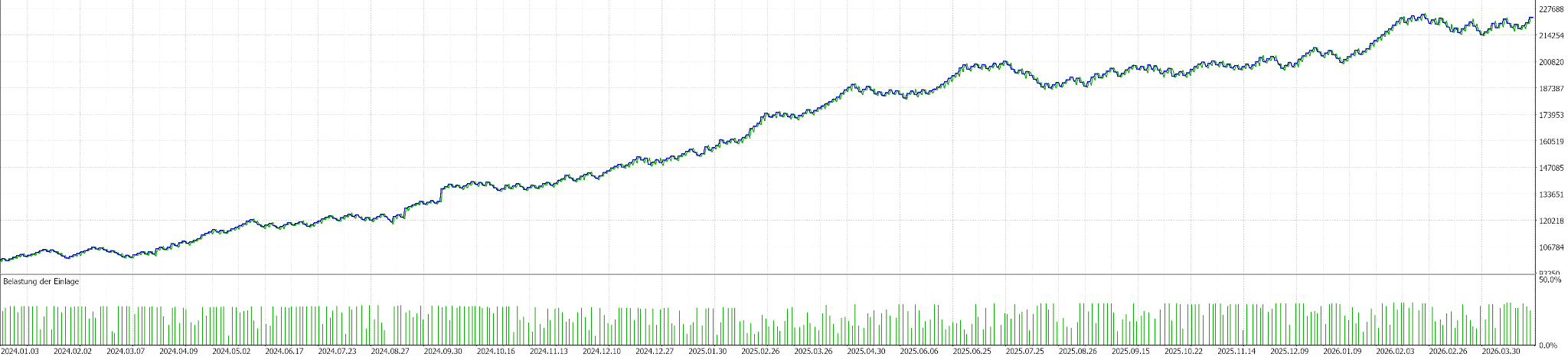
Strategy Tester evidence for linked setfiles. These snapshots document tested scenarios only; they are not live performance guidance.
Backtests
Linked setfiles, not live guidance.
- Return
- Net profit: 123,190.34
- +123.19%
- Max equity DD
- Absolute: 14,295.07
- 7.10%
- Win rate
- Profitable closed trades
- 65.53%
Return on initial deposit
Maximum equity drawdown
Strategy Tester metric
Test context
EURUSD M30, linked to one setfile.
- Symbol / TF
- EURUSD M30
- Test period
- Jan 2024 to Mar 2026
- 2 years 3 months
- Modelling
- 100% history quality
- Linked setfile
- Turtle Soup EA EURUSD M30
- v1.1 · 2026-05-09
- Source
- MetaTrader 5 Strategy Tester screenshot
Testing assets
Linked setfiles are research baselines for the named symbol and timeframe. Treat them as starting points for Strategy Tester work, not live trading instructions.
Turtle Soup EA EURUSD M30
Symbol-specific v1.1 starter configuration for testing the Turtle Soup EA on EURUSD in the 30-minute chart.
- Platform
- MetaTrader 5
- Asset
- EURUSD
- Timeframe
- M30
- Profile
- EURUSD v1.1
v1.1 · 2026-05-09
v1.1
2026-05-09
10 KB
Turtle Soup EA NASDAQ M30
Symbol-specific v1.1 starter configuration for testing the Turtle Soup EA on NASDAQ in the 30-minute chart. The matching performance snapshot can be added once the report and chart source images are available.
- Platform
- MetaTrader 5
- Asset
- NASDAQ
- Timeframe
- M30
- Profile
- NASDAQ v1.1
v1.1 · 2026-05-09
v1.1
2026-05-09
10 KB
Turtle Soup EA XAUUSD M30
Symbol-specific v1.1 starter configuration for testing the Turtle Soup EA on XAUUSD in the 30-minute chart.
- Platform
- MetaTrader 5
- Asset
- XAUUSD
- Timeframe
- M30
- Profile
- XAUUSD v1.1
v1.1 · 2026-05-09
v1.1
2026-05-09
10 KB
Optional legacy downloadsOlder versionsArchived baselines stay available here while the current v1.1 setfiles remain the primary downloads.1 file
Turtle Soup EA XAUUSD M30 Default v1.0
v1.0Legacy v1.0 XAUUSD M30 starter configuration retained for users who still need the previous baseline.
- Platform
- MetaTrader 5
- Asset
- XAUUSD
- Timeframe
- M30
- Profile
- Legacy default
Turtle Soup EA automates a defined false-breakout workflow in MetaTrader 5. It selects a reference level, waits for a sweep, confirms the reclaim, and then applies configured entry, stop, target, risk, session, spread, volatility, and safety filters.
It is not a general breakout robot or signal service. The value is that the sweep-and-reclaim model becomes explicit enough to test, accept, reject, or adjust with evidence.
Market model
Visible highs and lows attract breakout orders, stop orders, and pending liquidity. A Turtle Soup setup starts when price trades beyond such a level but fails to hold the breakout.
A sweep alone is not enough. Price can break a level and keep going. The setup becomes relevant only when price reclaims the prior structure quickly enough to suggest that the breakout may have failed.
This makes Turtle Soup a false-breakout model, not a prediction model. It asks a narrow question: did price take out a clear level, fail to hold beyond it, and return inside the structure with enough quality for a systematic test?
What the EA controls
The EA controls reference-level selection, sweep distance, ATR-based sweep checks, reclaim timing, candle quality, entry style, stop model, target model, position sizing, daily and weekly loss limits, session windows, weekdays, Friday cutoff, spread, volatility, trade count, losing-sequence rules, dashboard, and tester visuals.
Those controls reduce setup drift. One trader may use a pivot high, another a session high. One may require a close back inside the range, another may enter on an intrabar touch. Turtle Soup EA makes those choices visible and testable.
Setup evaluation
The first layer is reference level. The EA can work with pivot highs and lows, highest-lowest logic, previous day or week levels, and session-based levels. The purpose is to find a level meaningful enough to test as liquidity.
The second layer is sweep validation. Fixed points and ATR distance decide whether price moved far enough beyond the level. This helps avoid treating every small tick through a level as meaningful.
The third layer is reclaim quality. A close-confirmed reclaim is usually more stable for testing than intrabar noise. Candle-body and wick rules can make the model stricter, but stricter is not always better.
Only after those checks does execution matter. The EA can use market-style entries, pending orders around the swept level, break-style entries, or retest-style entries depending on mode. Then it calculates stop, target, and active risk controls.
Configuration workflow
Start with setup definition: reference-level mode, pivot left and right bars, lookback, level age, and untouched-level rules.
Then tune sweep and reclaim strictness. Review MinSweepPoints, MinSweepATRMultiplier, MaxBarsAfterSweepForReclaim, close-back-inside requirements, reclaim candle quality, and maximum reclaim age.
After that, adjust stop, target, and management. Sweep extreme with ATR buffer is the clean default stop concept. Fixed risk-reward targets are easier to compare during optimization. Partial closes, break-even, and trailing should be tested separately before being combined.
Risk deserves its own pass. Percent risk, maximum trades per day, maximum positions, daily and weekly loss limits, cooldown, and stop-after-loss controls are guardrails. They do not remove market risk.
Evidence and testing limits
The product package includes EURUSD M30, NASDAQ M30, and XAUUSD M30 v1.1 setfiles. The page links published Strategy Tester snapshots for the EURUSD M30 and XAUUSD M30 v1.1 setfiles. These are documented scenarios, not live instructions.
Test one symbol and one timeframe at a time. Start with the matching setfile, then confirm broker symbol specification, spread, commission, point size, server time, and session mapping. Change one group at a time: reference levels, sweep and reclaim, stop and target, then management and filters.
A strong-looking backtest can become fragile if many settings are tightly tuned together. Use out-of-sample periods, higher spread assumptions, worse slippage, and demo execution before live risk.
When not to use it
Avoid blind live deployment, news conditions, unstable spreads, untested symbols, and broker environments with unclear stop-distance or execution rules.
Be cautious in strong trend conditions. A level can sweep and reclaim briefly, then fail again as the larger move continues. Turtle Soup EA can make the rules consistent. It cannot make the market predictable or replace account rules, risk limits, and trader responsibility.
Key parameters
Configure these settings before live use. Review each group on the exact symbol, timeframe, broker, and account rules you intend to test.
| Setting | What to configure |
|---|---|
| Reference levels and sweep validation | Control which highs/lows are relevant, how far price must sweep, and whether a close back inside the range is required. |
| Entry and execution model | Use market, limit, reclaim-candle, or retest style entries depending on how selective the automation should be. |
| Risk and position sizing | Choose fixed lots, fixed money risk, or percent risk, then limit trades per session or after losing sequences. |
| Stops, targets, and trade management | Configure structure-based stops, fixed R targets, partial exits, break-even logic, or trailing models. |
| Session and broker filters | Restrict trading by weekday, session window, independent Friday cutoff, spread, volatility, and end-of-day behavior. |
| Backtest and chart visuals | Use tester-specific visual suppression to reduce chart drawing while still controlling dashboard, session lines, reference levels, and setup objects. |
Operating boundaries
Works well for
- Finding sweep-and-reclaim setups from configured reference levels
- Testing entry, stop, target, and management variants in MT5
- Keeping execution consistent through session, spread, volatility, weekday, and Friday cutoff filters
Limitations
- False breakouts can fail, especially in strong trend or news-driven conditions
- A setfile is a research baseline, not a universal live-trading setting
- Live results can differ from tester results because of broker data, spread, commission, and execution
User must test
- Symbol, timeframe, spread, commission, slippage, and broker server time
- Risk per trade, trade limits, losing-sequence rules, and drawdown tolerance
- Out-of-sample periods, demo execution, and the exact rules of the target account
Resources
Turtle Soup EA user manual
Installation notes, setup logic, key settings, risk controls, and recommended testing workflow for the Turtle Soup EA.
- Format
- Version
- v1
- File
- 104 KB
Version historyv1.12026-05-09 · Turtle Soup EA v1.1
Turtle Soup EA v1.1
Added
- Added
UseFridayCutoffso the Friday no-new-trades cutoff can be enabled or disabled independently from Friday trading. - Added
DisableChartVisualsInBacktestto optionally suppress chart visuals while running in the MetaTrader Strategy Tester. - Added chart-visual gating for dashboard updates, session lines, chart color scheme changes, reference levels, and setup objects.
Improved
- Improved weekday and Friday cutoff feedback by returning specific block reasons such as disabled weekdays or the active Friday cutoff time.
- Clarified stop-loss safeguard comments for
MaxSLPointsandMinSLPoints. - Clarified volatility filter comments for
MinATRandMaxATR.